Livestreams eintragenPublish livestreams
Mit Fooslink verknüpfst du deine Streams mit Terminen, Ligen und Begegnungen der Verbände. Fooseroo – und jede andere berechtigte App – zeigt sie genau dort, wo die Leute die Ergebnisse verfolgen.
Fooslink links your streams to federation events, leagues and matches. Fooseroo – and any other authorised app – shows them exactly where people follow the results.
So funktioniert esHow it works
Sports Hub: Fooslink ist für den Sports Hub des DTFB gebaut. Überall, wo du heute Inhalte aus dem Sports Manager wählst, ist der Sports Hub schon vorgesehen – er wird freigeschaltet, sobald er Inhalte liefert.
Sports Hub: Fooslink is built for the DTFB Sports Hub. Wherever you pick Sports Manager content today, the Sports Hub is already in place – it is switched on as soon as it delivers content.
1Zugang bekommenGet access
Fooslink steht allen offen, die Tischfußball streamen – Vereinen, Verbänden, Turnierveranstaltern und einzelnen Streamerinnen und Streamern. Zum Eintragen brauchst du nur eine Einladung – von einem Admin oder vom Besitzer eines Anbieters, für den du streamst; sie kommt per E-Mail. Noch niemanden? Schreib an sven@fooseroo.app mit deiner E-Mail-Adresse und den Verbänden, für die du eintragen möchtest. Danach meldest du dich unter link.fooseroo.app mit dieser Adresse an – du bekommst einen Code per E-Mail, kein Passwort nötig.
Fooslink is open to everyone who streams table soccer – clubs, federations, tournament organisers and individual streamers. To publish you just need an invitation – from an admin or from the owner of a provider you stream for; it arrives by email. Nobody yet? Email sven@fooseroo.app with your address and the federations you want to publish for. Then sign in at link.fooseroo.app with that address – you get a code by email, no password needed.
2Anbieter & KanäleProviders & channels
Ein Anbieter ist, wer streamt – ein Verein, ein Verband, ein Kanal wie TischKickTV. Er hat Kanäle (Adressen bei YouTube, Twitch & Co.), interne Kontakte und einen Hinweis, wen man wofür erreicht.
A provider is whoever streams – a club, a federation, a channel like TischKickTV. It has channels (addresses on YouTube, Twitch & co.), internal contacts and a note on whom to reach for what.
- Anlegen und löschen können nur Admins. Brauchst du einen neuen Anbieter, melde dich bei einem Admin – unter „Kontakt & Admins“ im Dashboard steht, wer das ist.
- Besitzer – ein Anbieter kann mehrere haben, alle gleichberechtigt – verwalten Angaben, Kanäle und Berechtigte. Sie machen andere zu Besitzern oder entziehen den Besitz, so geht auch ein Besitzerwechsel. Den eigenen Besitz kann man abgeben, nur der letzte Besitzer nicht.
- Berechtigte nutzen die Kanäle des Anbieters in Einträgen und in der Live-Regie.
- Einladen per E-Mail: Besitzer laden unter „Berechtigte“ per Adresse ein – die Einladung gilt für diesen Anbieter, und das Recht wählst du gleich mit: berechtigt oder Besitzer. Wer schon dabei ist, wird sofort berechtigt (das Dashboard zeigt es beim Tippen an); neue Leute sind es, sobald sie sich zum ersten Mal anmelden.
- Mitwirkende: Neue Leute kannst du auch nur als Mitwirkende einladen. Sie tragen Einträge bei – auch in der Live-Regie –, ändern aber nur ihre eigenen, und das bis vier Wochen nach deren Ende. Besitzer werden sie nicht.
- Auf einen Spielort eingrenzen: Mitwirkende kannst du zusätzlich auf einen Spielort eingrenzen – beim Einladen oder später mit „Spielort“ neben ihrem Namen. Dann tragen sie nur Begegnungen ein, die dort stattfinden (Zeitfenster rund um den Anstoß), und Termine, die den Spielort nennen (am Tag des Termins). Was sie wählen dürfen, sehen sie unter „Neuer Eintrag“ oben im Kasten und übernehmen es mit einem Klick. Aufheben können die Eingrenzung nur Besitzer.
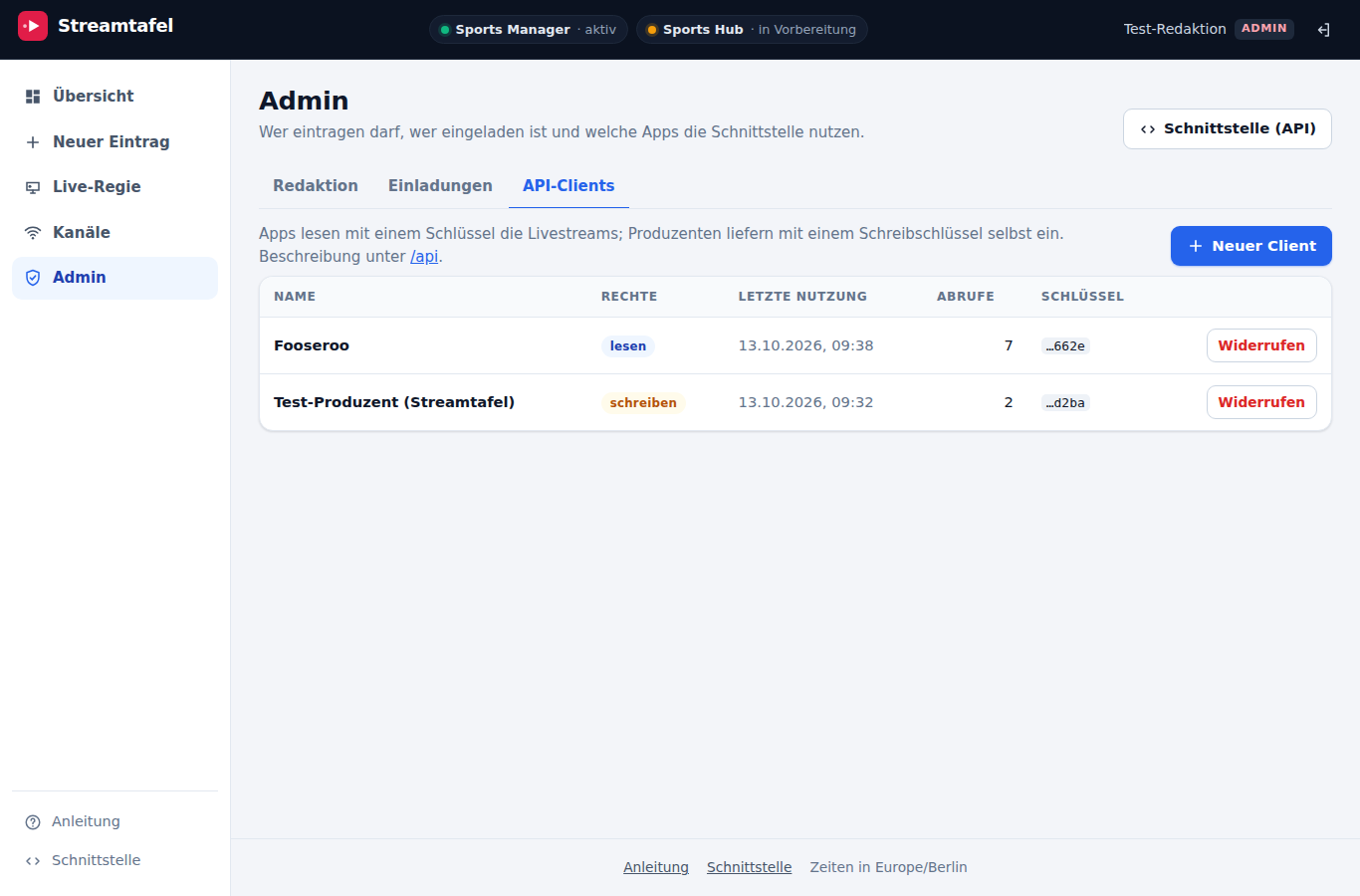
- API-Schlüssel: Besitzer stellen für ihren Anbieter selbst Schlüssel aus – für Turniersoftware, OBS-Skripte oder andere Programme, am besten einen je App bzw. Gerät und mit einer Beschreibung, wofür er ist. Die Stufe entspricht den Rollen: Mitwirkend (empfohlen; nur eigene Einträge, auf Wunsch auf einen Spielort eingegrenzt), Berechtigt oder Besitzer (beide dürfen auch ältere und fremde Einträge ändern – das Dashboard fragt nach). Der Schlüssel wird nur einmal angezeigt; löschen kannst du ihn jederzeit.
- Mails: Fooslink schreibt bei Einladungen und wenn sich Berechtigung oder Besitz ändern – an die betroffene Person; eine Antwort geht an die, die geändert hat.
- Only admins create and delete providers. If you need a new one, get in touch with an admin – “Contact & admins” in the dashboard shows who they are.
- Owners – a provider can have several, all with equal rights – manage details, channels and authorised people. They make others owners or revoke ownership, which is also how ownership is handed over. You can give up your own ownership, except the last owner.
- Authorised people use the provider’s channels in entries and on the live desk.
- Invite by email: owners invite by address under “Authorised people” – the invitation applies to that provider, and you pick the right along with it: authorised or owner. People already on Fooslink are authorised right away (the dashboard shows it as you type); new people as soon as they first sign in.
- Contributors: you can also invite new people as contributors only. They add entries – on the live desk too – but change only their own, up to four weeks after they end. They cannot become owners.
- Restrict to a venue: you can also restrict contributors to one venue – when inviting them or later with “Venue” next to their name. They then only enter matches played there (time window around kick-off) and events that name the venue (on the day of the event). They see what they may choose at the top of “New entry” and take it over with one click. Only owners can lift the restriction.
- API keys: owners issue keys for their provider themselves – for tournament software, OBS scripts or other programs, ideally one per app or device and with a description of what it is for. The level matches the roles: Contributor (recommended; own entries only, optionally restricted to a venue), Authorised or Owner (both may also change older entries and those of others – the dashboard asks first). The key is shown only once; you can delete it at any time.
- Emails: Fooslink writes on invitations and whenever authorisation or ownership changes – to the person concerned; replies go to whoever made the change.
3ÜbersichtOverview
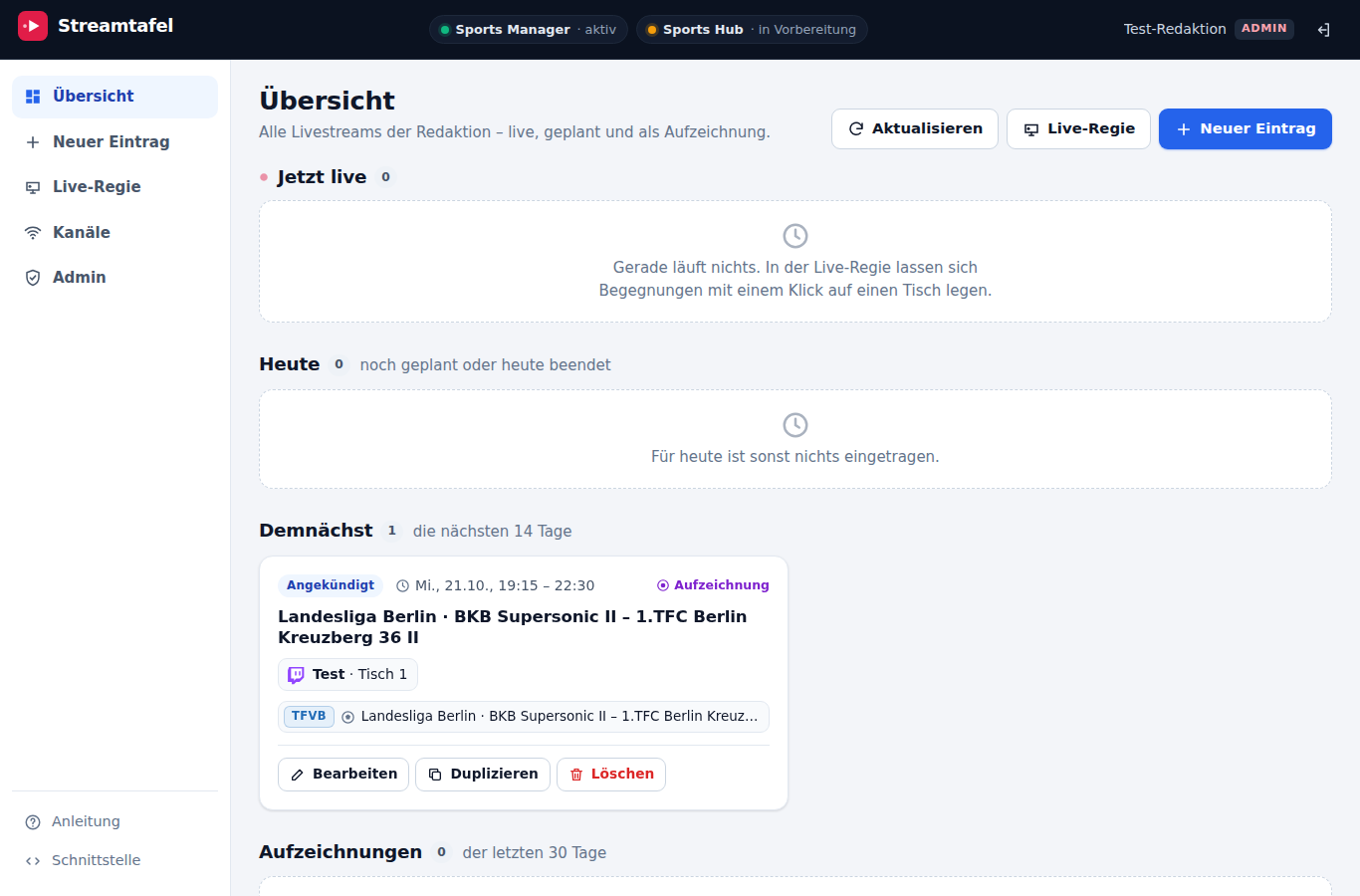
Auf einen Blick: was gerade live ist, was heute und in den nächsten Tagen kommt und welche Aufzeichnungen angeboten werden. Jeder Eintrag lässt sich bearbeiten, duplizieren, sofort beenden oder löschen.
At a glance: what is live now, what is coming today and over the next days, and which recordings are offered. Every entry can be edited, duplicated, ended right away or deleted.
4Einen Eintrag anlegenCreate an entry
Termin – auch bei mehreren VerbändenEvent – across federations
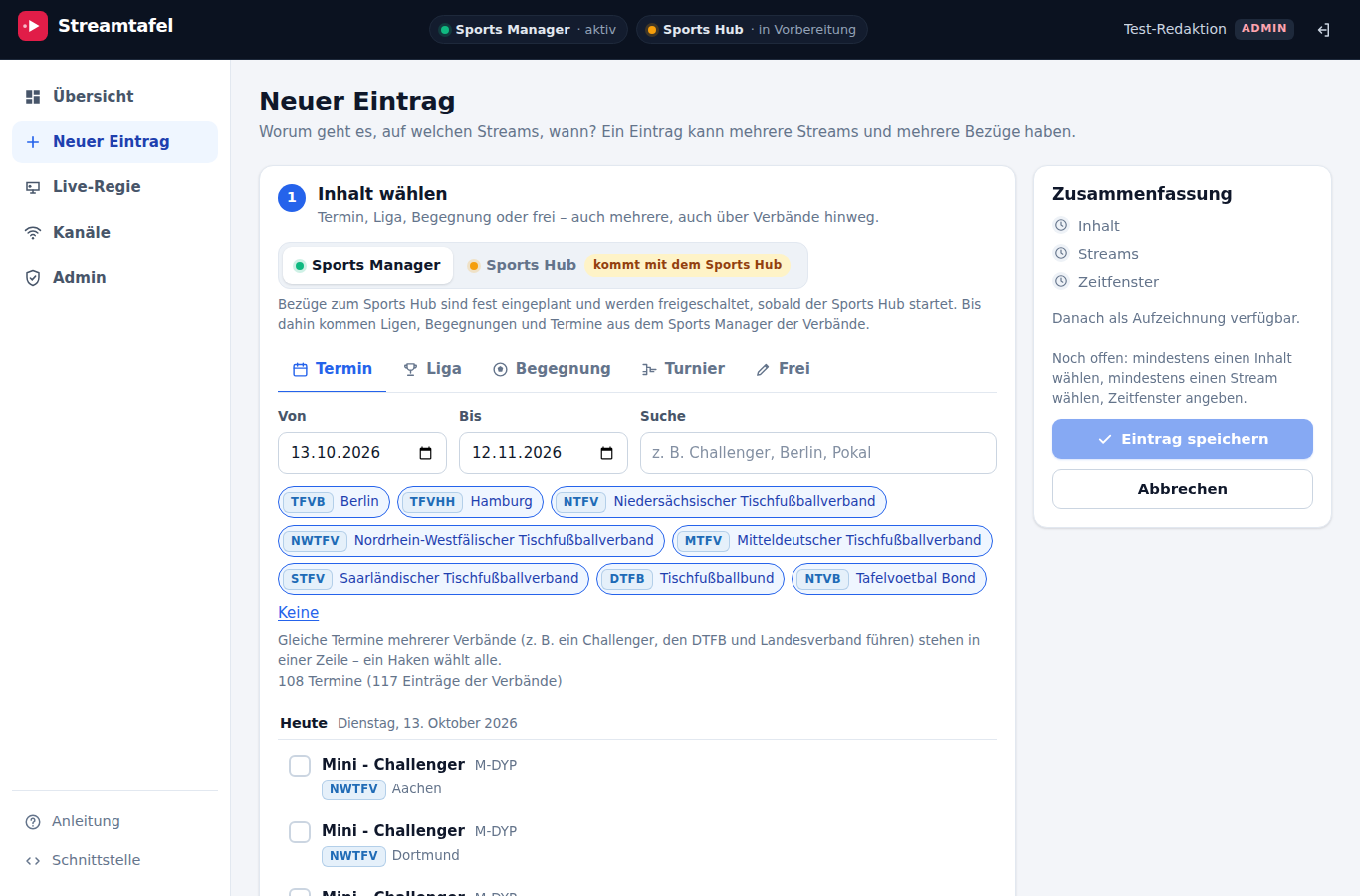
Wähle einen Zeitraum und such nach dem Turnier. Steht derselbe Termin beim DTFB und beim Landesverband (etwa ein Challenger), erscheint er in einer Zeile mit beiden Verbänden – ein Haken wählt beide. Die Termine dürfen sich dabei unterscheiden.
Pick a date range and search for the tournament. If the same event is listed by the DTFB and a state federation (e.g. a Challenger), it appears as one row with both federations – one tick selects both. The listings may differ.
Liga oder Begegnung – entweder, oderLeague or match – one or the other
- Ganze Liga: Für einen Spieltagsabend gibst du an, welche Streams in der Liga laufen – ein Eintrag, ein Zeitfenster. Ein Spieltag-Helfer füllt das Fenster aus den Anstoßzeiten.
- Einzelne Begegnungen: Jeder Stream gehört zu einer bestimmten Begegnung. Das geht hier im Eintrag – oder bequemer in der Live-Regie (Schritt 5).
- Whole league: for a match night, state which streams run in the league – one entry, one time window. A matchday helper fills the window from the kick-off times.
- Single matches: each stream belongs to a particular match. Do it here in the entry – or more conveniently in the live desk (step 5).
Turnier und freiTournament and free
Turniere legt der Sports Manager erst nachträglich an; live laufen sie über das Kickertool und stehen als Termin im Kalender – wähl also den Termin. Ein Stream ohne Bezug zu Verbandsinhalten ist ein freier Eintrag.
The Sports Manager creates tournaments only afterwards; live they run on the Kickertool and appear as an event in the calendar – so pick the event. A stream not tied to federation content is a free entry.
Streams und ZeitfensterStreams and time window
Wähl deine Kanäle (als Besitzer des Anbieters kannst du gleich einen neuen anlegen) und prüf das Zeitfenster – es ist aus dem Inhalt vorbelegt (Termin: der ganze Tag, Begegnung: ab 15 Minuten vor Anstoß). Mit Aufzeichnung bleibt der Stream danach abrufbar, auf Wunsch unter einer eigenen Adresse – etwa live auf Twitch, die Aufzeichnung später bei YouTube; sie gehört dem Anbieter, den du dafür wählst. Mit als neu verfügbar melden zeigen Apps wie Fooseroo sie als Neuigkeit (Vorgabe aus, damit nachgetragene ältere Aufzeichnungen nicht als neu erscheinen).
Choose your channels (as an owner of the provider you can create a new one right there) and check the time window – it is prefilled from the content (event: the whole day, match: from 15 minutes before kick-off). With recording the stream stays available afterwards, optionally at a separate URL – e.g. live on Twitch, the recording later on YouTube; it belongs to the provider you pick for it. Announce as newly available makes apps like Fooseroo show it as news (off by default, so older recordings added later don’t appear as new).
5Live-Regie: am Spielabend zuteilenLive desk: assign during the night
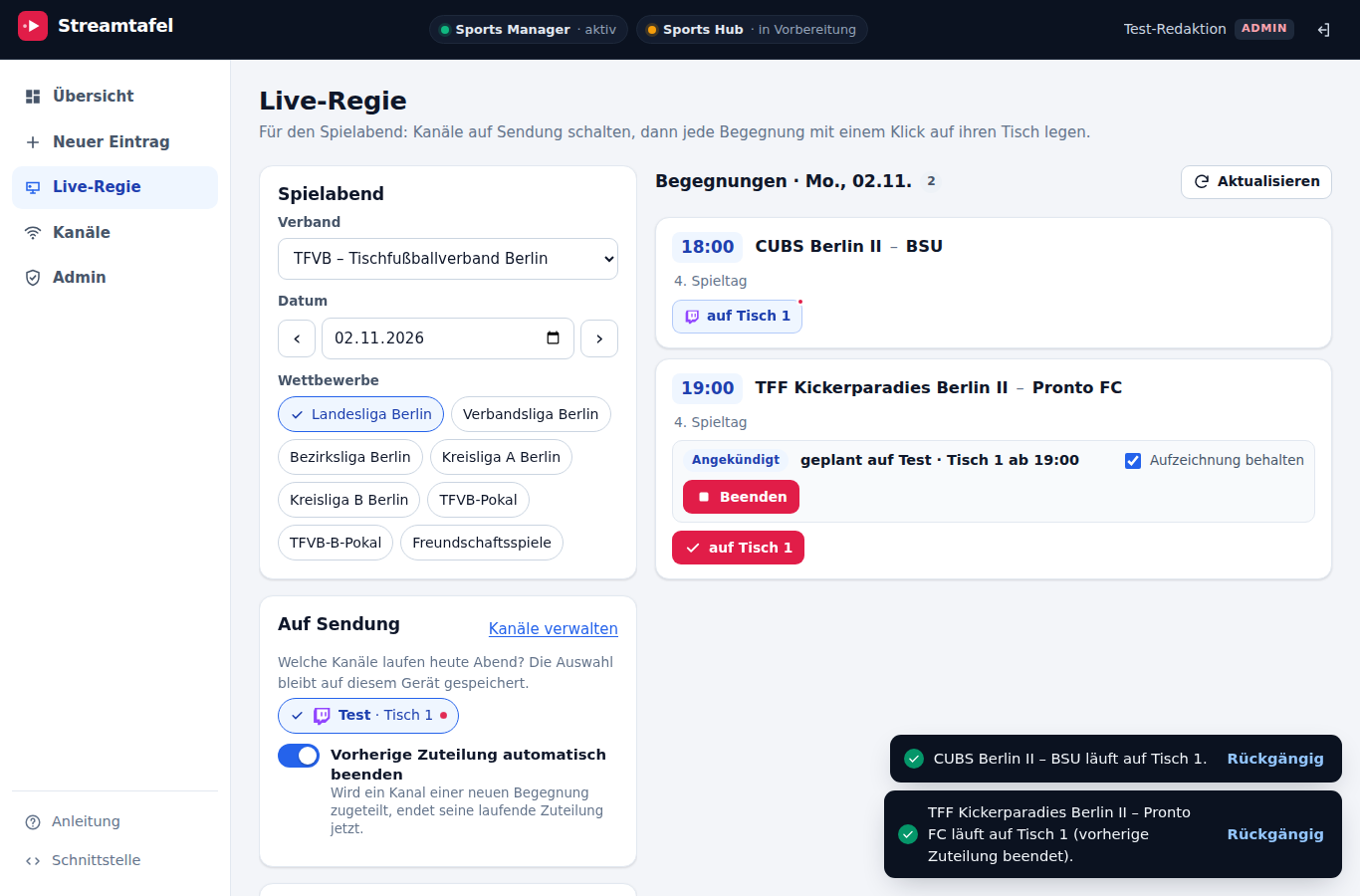
Wähl Verband, Wettbewerbe und Datum. Schalte die Kanäle „auf Sendung", die heute laufen. Dann legst du jede Begegnung mit einem Klick auf ihren Tisch – die vorige Begegnung auf diesem Tisch endet dabei automatisch. Ein Klick auf Beenden schließt das Fenster; Aufzeichnung behalten lässt den Stream an der Begegnung stehen.
Choose federation, competitions and date. Put tonight's channels "on air". Then assign each match to its table with one click – the previous match on that table ends automatically. End closes the window; keep recording leaves the stream on the match.
Begegnungen, die der Verband erst während des Abends anlegt, erscheinen nach „Aktualisieren" (oder spätestens nach 30 Sekunden).
Matches the federation adds during the night appear after "Refresh" (or within 30 seconds).
Hat der Verband einer Begegnung einen Tisch zugewiesen, steht er dabei. Beim ersten Live-Schalten einer Sitzung fragt die Regie einmal nach – ab dann sehen alle Apps den Stream binnen Minuten.
If the federation has assigned a table to a match, it is shown. The first time you go live in a session, the desk asks once – from then on every app shows the stream within minutes.
6Videos übernehmen: YouTube-Kanal nachtragenImport videos: catch up on a YouTube channel
Unter Videos übernehmen wählst du einen YouTube-Kanal eines beliebigen Anbieters. Fooslink listet seine Videos samt Livestream-Aufzeichnungen – ohne Shorts und ohne die, die schon in einem Eintrag stehen – mit Bezeichnung und Adresse. Zu jedem Video steht ein Vorschlag je Verband, wozu es gehört: zu einem Turnier und seinen Disziplinen, zum Spieltag einer Liga mit den Begegnungen, die es zeigt, oder zu einem Termin, wenn das Turnier fehlt – meist beim Landesverband und beim DTFB. Der Vorschlag stützt sich auf Datum, Namen, Ort und Verband im Titel (etwa „NRW“, „Kölner …“), auf Mannschaften und Tische („Tisch 17“), ein Datum in der Beschreibung und den Tag der Veröffentlichung. Ein Datum allein genügt nicht.
Under Import videos you pick a YouTube channel of any provider. Fooslink lists its videos including live stream recordings – without Shorts and without those already in an entry – with title and URL. Each video comes with a suggestion per federation of what it belongs to: a tournament and its disciplines, a league matchday with the matches it shows, or an event when the tournament is missing – usually at the regional federation and at the DTFB. The suggestion draws on the date, names, place and federation in the title (such as “NRW”, “Kölner …”), on teams and tables (“Table 17”), a date in the description and the day it was published. A date alone is not enough.
Passt der Vorschlag, genügt Eintrag anlegen: Fooslink legt eine Aufzeichnung an – ohne sie unter „Aktuell“ zu melden – quittiert das an der Karte und blendet sie aus. Sonst wählst du vorher selbst; ohne gewählte Disziplin bezieht sich der Eintrag auf das ganze Turnier, ohne gewählte Begegnung auf die ganze Liga.
If the suggestion fits, Create entry is all it takes: Fooslink creates a recording – without announcing it under “Current” – confirms it on the card and fades it out. Otherwise choose yourself first; with no discipline chosen, the entry refers to the whole tournament, with no match chosen to the whole league.
Anlegen kann, wer für den Anbieter des Kanals berechtigt ist. Bei welchen Verbänden gesucht wird, stellst du oben ein; vorgewählt sind der Verband des Anbieters und der DTFB – nennt der Anbieter keinen Landesverband (wie TischkickTV), alle.
Anyone authorised for the channel’s provider can create entries. You choose above which federations to search; the provider’s federation and the DTFB are preselected – all of them if the provider names no regional federation (like TischkickTV).
7Wo die Streams erscheinenWhere streams show up
In Fooseroo erscheinen sie an der Begegnung, in der Liga, am Termin und im Streifen „Gerade live" – meist nach ein bis zwei Minuten, in der App spätestens nach fünf. Ein Klick öffnet den Stream bei seinem Anbieter. Jede andere App mit Schlüssel bekommt dieselben Einträge über die Schnittstelle.
In Fooseroo they appear on the match, in the league, on the event and in the "Live now" strip – usually within one or two minutes, in the app within five at most. A tap opens the stream at its provider. Any other app with a key gets the same entries through the API.
Für App-Entwickler und ProduzentenFor app developers and producers
Fooslink ist offen für alle Tischfußball-Apps: Lesen mit einem App-Schlüssel, Einliefern (z. B. aus Turniersoftware oder Streaming-Werkzeugen) mit einem Produzenten-Schlüssel. Geliefert werden Bezüge – Verband, Inhaltstyp, Kennungen –, keine Namen oder Ergebnisse; die holt jede App selbst beim Verband. Die Beschreibung samt OpenAPI-Datei steht nach der Anmeldung im Fooslink-Dashboard unter „Schnittstelle“. Schreibschlüssel stellen die Besitzer eines Anbieters selbst aus (siehe Abschnitt 2), Leseschlüssel für Apps vergeben die Admins – formlos anfragen unter sven@fooseroo.app.
Beim Einliefern regelt Fooslink Überschneidungen selbst: Schickt derselbe Schlüssel denselben Inhalt noch einmal, wird sein Eintrag ersetzt statt verdoppelt; gibt es den Inhalt am selben Kanal zur selben Zeit schon, wird abgelehnt; ein älterer eigener Eintrag am selben Kanal endet, wenn der nächste beginnt. Auf einen Spielort eingegrenzte Schlüssel fragen unter /api/v1/anlaesse ab, was sie wählen dürfen.
Fooslink is open to all table-soccer apps: read with an app key, publish (e.g. from tournament software or streaming tools) with a producer key. It delivers references – federation, content type, IDs – not names or results; every app fetches those from the federation itself. The documentation and the OpenAPI file are in the Fooslink dashboard under “API” once you sign in. Write keys are issued by a provider’s owners themselves (see section 2); read keys for apps by the admins – just ask at sven@fooseroo.app.
When publishing, Fooslink handles overlaps itself: if the same key sends the same content again, its entry is replaced rather than duplicated; if the same content already exists on the same channel at the same time, the request is rejected; an older own entry on the same channel ends when the next one starts. Keys restricted to a venue ask /api/v1/anlaesse what they may choose.